Python Communication Protocol
This example uses the python communication protocol library to drive a Twist 1.4.1 board in Buck mode.
The script will send data to the board, retrive the measurements and show them on a graph.
Danger
This is an advanced example. Make sure you are comfortable with using the voltage mode before doing this emulator.
Hardware wiring and requirement
The wiring of the system is given by the image below:
- The power converter is connected in buck mode with a source and a load.
- LEG1 and LEG2 are connected in parallel on the low side, as shown in the figure below.
- The converter is connected to the computer via its USB connector.
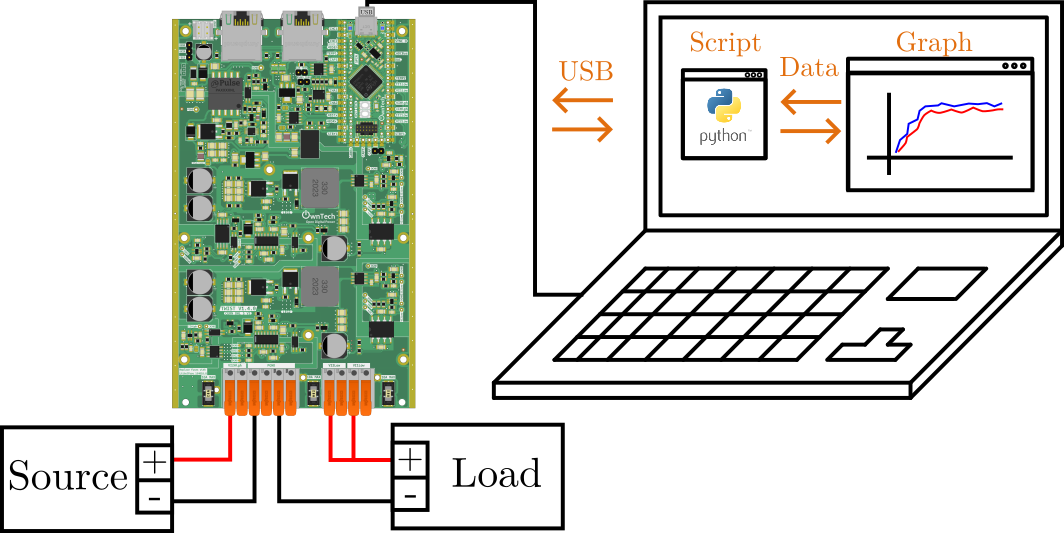
You will need : - 1 TWIST (it works with the OWNVERTER too!) - 1 dc power supply (20-60V) - 1 power load - 1 PC
Warning
Embedded Firmware setup
We import the communication_library in platformio.ini via the line. Be careful to include the #power_tuesday at the end, since it will get the right version of the protocol :
lib_deps=
    comm_protocol = https://github.com/owntech-foundation/python_twist_comm_protocol.git#power_tuesday
Embedded Firmware explanation
The emebedded firmware will configure the TWIST or OWNVERTER board to be able to communicate with your computer via python.
The software deploys a communication system with three modes:
- IDLE
 in the application_task: stops broadcasting data
-
 in the critical_task: stops the power flow
 -
POWER_OFF
- in the application_task: broadcasts system status data on the serial port
-
in the critical_task: stops the power flow
-
POWER_ON
- in the application_task: broadcasts sensor data on the serial port together with other data
- in the critical_task: starts the power flow, controls the power flow with a PID
Tip
Characters are sent via the Serial port to the SPIN board.
It parses these characters and decides which value to put in which variables that describes the power converter.
For more details, please checkout the communication protocol library readme
Python script
The Python code handles communication, the voltage reference and plotting the data from the board.
It will send a triangular waveform to the board and plot it in real-time.
Tip
The script sends out a frame that is pre-structured to be parsed by the C code. For instance:
Translates toThe communication_task on the Twist board will get the first character of the message using console_getchar(). And then it will call a handler using initial_handle.
  void loop_communication_task()
  {
      received_char = console_getchar();
      initial_handle(received_char);
  }
The handler will decide what the message is about and then update the appropriate structure of the communicaiton protocol that handles the information.
Which activates the power leg LEG1.
Hardware setup
This code was tested using the following hardware setup:
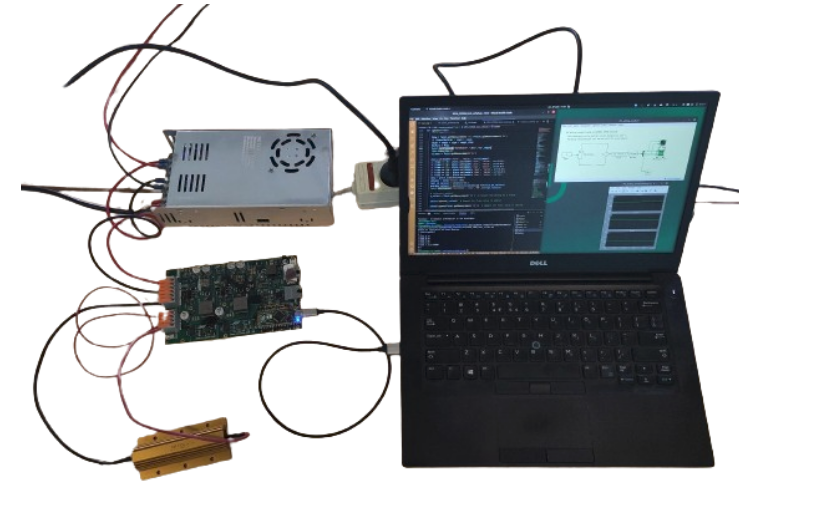
On the photo:
- A computer running the comm_script.py python script.
- A Twist board connected in Buck mode.
- A voltage source.
- A resistor connected to LEG1 and LEG2
- LEG1 and LEG2 connected in parallel.
How to use this example
Before running the code
!!! warning Make sure you have:
- python installed in your computer.
- that you follow the firmware setup instructions and have the appropriate libraries listed in platformio.ini.
- flash the main.cpp in your Twist board
Once all of the above are ok, you can then run the comm_script.py script with your python3.