Minimal RS485 MASTER/FOLLOWER
This tutorial shows the smallest useful RS485 exchange between two TWIST boards.
- One board is the
ROLE_MASTER. - One board is the
ROLE_FOLLOWER. - The MASTER sends a voltage reference named
voltage_ref. - The FOLLOWER receives it, measures/fills
voltage_meas, then sends a reply.
The important idea is simple: RS485 sends raw bytes. In this example, those bytes
are interpreted as one C++ structure called RS485_frame.
Minimal Hardware Setup
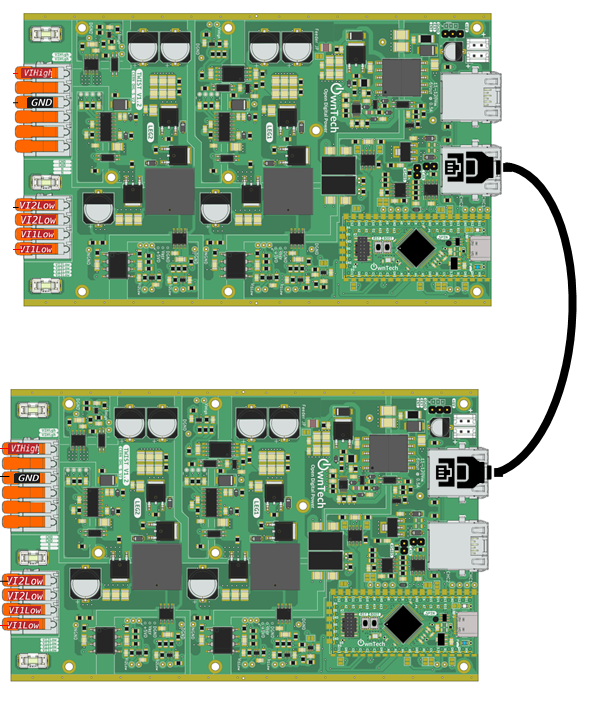
Connect two TWIST boards with an RJ45 cable, then supply both TWIST boards with at least 12 V.
Select The Role
The same code is used on both boards. The only difference is the role selected in main.cpp:
Flash one board with:
Flash the other board with:
What Is Sent On RS485
The RS485 message is defined by this structure:
struct RS485_frame
{
    float voltage_ref;
    float voltage_meas;
    uint8_t sender_id;
    uint8_t status_code;
} __packed;
Each field is one piece of information exchanged between the two boards:
| Field | Written by | Read by | Meaning |
|---|---|---|---|
voltage_ref |
MASTER | FOLLOWER | Voltage reference requested by the MASTER |
voltage_meas |
FOLLOWER | MASTER | Voltage measured by the FOLLOWER |
sender_id |
Both boards | Both boards | Tells who sent the frame |
status_code |
MASTER | FOLLOWER | Tells the FOLLOWER which mode to apply, for example IDLE or POWER |
Both boards must use exactly the same RS485_frame definition. If you add, remove,
or reorder fields, update the code on both boards before testing.
How The Data Moves
There are three buffers/variables to understand:
RS485_frame frame_tx;      // Data you want to send
RS485_frame frame_rx;      // Data you have just received
uint8_t buffer_tx[...];    // Raw bytes actually sent by the RS485 driver
uint8_t buffer_rx[...];    // Raw bytes actually received by the RS485 driver
Before sending, the code copies the C++ structure into the RS485 transmit buffer:
After receiving, the code copies the RS485 receive buffer back into a C++ structure:
So the complete workflow is:
- Put values into
frame_tx. - Copy
frame_txintobuffer_tx. - Call
communication.rs485.startTransmission(). - The other board receives bytes in
buffer_rx. - Copy
buffer_rxintoframe_rx. - Read values from
frame_rx.
Communication Flow
Every 100 us in loop_critical_task():
- MASTER fills
frame_tx: voltage_ref = 32.0Fsender_id = ROLE_MASTERstatus_code = POWER- MASTER copies
frame_txintobuffer_tx. - MASTER starts the RS485 transmission.
- FOLLOWER receives the bytes and enters
reception_function(). - FOLLOWER copies
buffer_rxintoframe_rx. - FOLLOWER reads
frame_rx.voltage_refandframe_rx.status_code. - FOLLOWER fills its own
frame_txwithvoltage_meas. - FOLLOWER copies
frame_txintobuffer_tx. - FOLLOWER starts its RS485 reply.
- MASTER receives the reply in
reception_function(). - MASTER copies
buffer_rxintoframe_rx. - MASTER reads
frame_rx.voltage_meas.
RS485 Configuration
RS485 is configured once in the setup:
communication.rs485.configure(
buffer_tx,
buffer_rx,
sizeof(buffer_rx),
reception_function,
SPEED_20M
);
This means:
| Argument | Meaning |
|---|---|
buffer_tx |
Buffer used by the driver to send bytes |
buffer_rx |
Buffer used by the driver to receive bytes |
sizeof(buffer_rx) |
Number of bytes expected in one received frame |
reception_function |
Function called automatically when a frame is received |
SPEED_20M |
RS485 communication speed, here 20 Mbit/s |
Serial Console
Available keys:
h: print the help menui: switch to IDLE modep: switch to POWER mode
Press p in the serial monitor to start the POWER exchange.
Task Architecture
The example has three tasks:
loop_background_task: prints status, blinks LED, then sleeps for 2 s.loop_critical_task: runs every 100 us and starts MASTER transmissions.loop_communication_task: reads the serial console.
The MASTER starts the periodic exchange from loop_critical_task().
The FOLLOWER replies from reception_function() as soon as it receives a MASTER frame.
Customize The Frame
To send a new value, you must do four things:
- Add the value to
RS485_frame. - Fill the value in
frame_txbeforememcpy(buffer_tx, &frame_tx, sizeof(frame_tx));. - Read the value from
frame_rxaftermemcpy(&frame_rx, buffer_rx, sizeof(frame_rx));. - Make sure
buffer_txandbuffer_rxare large enough for the new structure.
Example: Add A Temperature Sent By The FOLLOWER
First, add the new field to the frame:
struct RS485_frame
{
float voltage_ref;
float voltage_meas;
float temperature_meas;
uint8_t sender_id;
uint8_t status_code;
} __packed;
On the FOLLOWER, fill the value before sending the reply:
frame_tx.sender_id = ROLE_FOLLOWER;
frame_tx.voltage_meas = measured_voltage;
frame_tx.temperature_meas = measured_temperature;
memcpy(buffer_tx, &frame_tx, sizeof(frame_tx));
communication.rs485.startTransmission();
On the MASTER, read the value after receiving the reply:
memcpy(&frame_rx, buffer_rx, sizeof(frame_rx));

if (frame_rx.sender_id == ROLE_FOLLOWER)
{
    follower_voltage = frame_rx.voltage_meas;
    follower_temperature = frame_rx.temperature_meas;
}
Example: Add A Command Sent By The MASTER
First, add the command to the frame:
struct RS485_frame
{
    float voltage_ref;
    float voltage_meas;
    float temperature_meas;
    uint8_t fan_enable;
    uint8_t sender_id;
    uint8_t status_code;
} __packed;
On the MASTER, fill the command before sending:
frame_tx.sender_id = ROLE_MASTER;
frame_tx.status_code = POWER;
frame_tx.voltage_ref = 32.0F;
frame_tx.fan_enable = 1;

memcpy(buffer_tx, &frame_tx, sizeof(frame_tx));
communication.rs485.startTransmission();
On the FOLLOWER, read the command after receiving: